
Batteries for MSI KATANA A17 AI B8VG 11.4V


Note :
Only compatible with white connector batteries
- SKU:CBNT550
- Condition:Replacement, Brand New
- Voltage:11.4V
- Capacity:65Wh, 5700mAh
- Cells:3-Cell
- Chemistry:Li-polymer
- Dimension:*mm(L x W x H)
- Color:Black
- Net Weight:*g
- Shipping Method:USPS
- Availability:In Stock
Batteries for MSI KATANA A17 AI B8VG 11.4V

Note :
Only compatible with Black connector batteries
- SKU:CBNT551
- Condition:Replacement, Brand New
- Voltage:11.4V
- Capacity:65Wh, 5700mAh
- Cells:3-Cell
- Chemistry:Li-polymer
- Dimension:*mm(L x W x H)
- Color:Black
- Net Weight:*g
- Shipping Method:USPS
- Availability:In Stock
Batteries for MSI KATANA A17 AI B8VG 11.4V

Note :
Only compatible with Black connector batteries
- SKU:CBNT8515
- Condition:Replacement, Brand New
- Voltage:11.4V
- Capacity:53.5Wh, 4700mAh
- Cells:3-Cell
- Chemistry:Li-polymer
- Dimension:*mm(L x W x H)
- Color:Black
- Net Weight:*g
- Shipping Method:USPS
- Availability:In Stock
Batteries for MSI KATANA A17 AI B8VG 11.4V
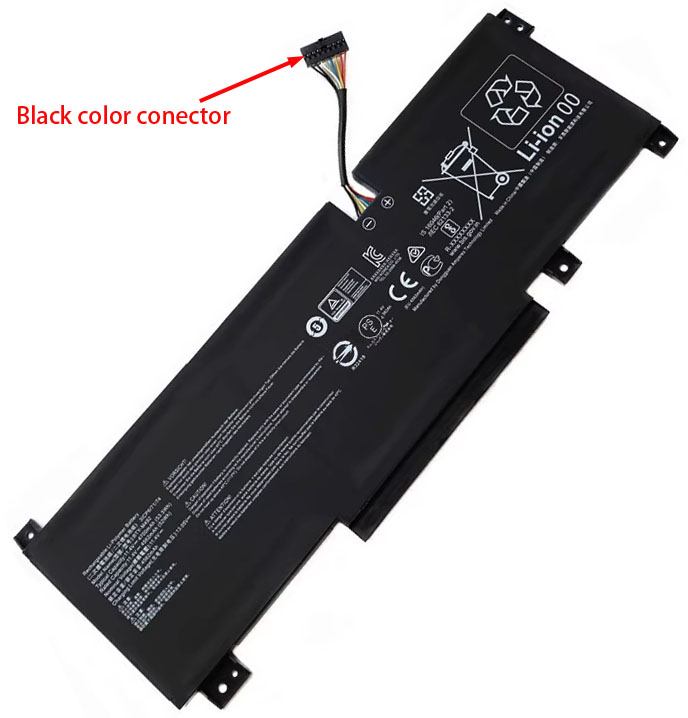
Note :
Only compatible with white connector batteries
- SKU:CBNT2198
- Condition:Replacement, Brand New
- Voltage:11.4V
- Capacity:53.5Wh, 4700mAh
- Cells:3-Cell
- Chemistry:Li-polymer
- Dimension:*mm(L x W x H)
- Color:Black
- Net Weight:*g
- Shipping Method:USPS
- Availability:In Stock
- 30 days money back.
- Replacement battery 1 year warranty, original battery 6 months warranty !
- Brand-new, no refurbished.
- Korea, Japan or PRC. made grade A cells.
- Li-ion battery have no memory effect and environment friendly.
- Strict Li-ion battery circuit management.
- 800-1200 full charge(discharge) times at least.
- 100% compatible with original equipment charger.
- Li-ion technology gives battery a long life and light weight.
- built-in rechargeable Li-ion battery protection circuit.
- Certification: CE, CCC, Ul, ISO9001, ROHS Etc.
Product Features
High Quality,Excellent Service
Our laptop batteries are made with high-quality lithium-ion battery cells that are brand new and perfectly compatible with the original manufacturer specifications, and even surpass them in performance. With high-quality battery cells and materials, your laptop will run longer and more reliably. Additionally, this battery has no "memory effect" and there is no need to discharge it before each charge, making it even more convenient for you to use our replacement battery.
There are many third-party companies on the market selling laptop batteries, all of which offer similar prices. However, our prices are among the lowest, with much higher service and product quality. We are proud to have sold to over 60 countries worldwide and to have over 500,000+ satisfied customers.
Furthermore, we offer a 30-day money-back guarantee and one-year warranty. If you are dissatisfied with your laptop battery purchase, please refer to our Quick Exchange and Refund policy for more details. Thank you for choosing our product!
Multiple Intelligent Protection
- CHARGING TIME PROTECTION
- CLASS A PROTECTION
- CURRENT PROTECTION
- ELECTRO-MAGNETIC
- ESD PROTECTION
- INTELLIGENT PROTECTION
- POWER PROTECTION
- OVER DISCHARGE PROTECTION
- OVER HEAT PROTECTION
- OVER CHARGE PROTECTION
- SHORT CIRCUIT
- VOLTAGE PROTECTION
Compatible Part Numbers
Fit Laptop Models
Note:Please note that this is not an exhaustive list. If your original battery part number or your machine model name is not listed in the description, our battery may still be compatible with your laptop. Don't hesitate to contact us to confirm compatibility.
Shipping & Payment

Once payment has been made, we will arrange shipment within 48 hours. Once shipment is confirmed, a tracking number will be sent to you via email..
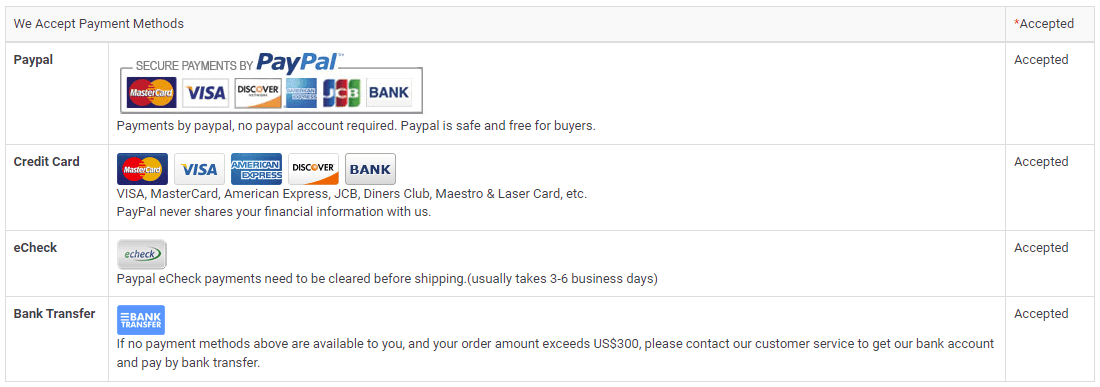
Note:We use "Paypal Express Checkout" as the check out process (Suggested revision), the order will be shipped to your PayPal address. if you want to change address, please contact us(Change Shipping Address) in time. We are not responsible for wrong or undeliverable address.
Suggested revision: Just wanted to let you know that the safest option is to store your personal information in your PayPal account, rather than on our website. This way, you can be sure that your information is secure.
Warranty
30 Days Money Back Guarantee
We're honored to offer a 30-day money-back guarantee because your satisfaction is our top priority. If you're not satisfied with the Laptop Battery after receiving it, please let us know and we'll be happy to issue a refund.
One Year Warranty
We also offer a one-year warranty for our Batteries from the original purchase date. Please note that replacement items don't extend or restart the warranty period.
Please note that for battery pack or battery-related products, the warranty will be void if the battery pack was improperly charged, installed, or misused in any way. Also, please be aware that if the label and/or barcoded warranty label has been removed or tampered with, the warranty will be void as well.
Returns
Hi there! If you happen to encounter any issues with the battery you purchased from us, please don't hesitate to reach out to us first. We'll process your request and do our best to find a solution for you. In the event that our technical support engineer is unable to resolve the issue, we'll provide you with an RMA number (Return Material Authorization). If it turns out that the battery is indeed defective, we'll ship you a new one at no extra cost.
Just a friendly reminder: Please make sure to obtain an RMA number before returning any batteries. We won't be able to process your return without it.
Laptop Batteries FAQ
A part number is a unique identifier that is assigned to a part to simplify referencing and to unambiguously define a part within a single manufacturer. Knowing about part number of the battery will more accessible to buy a correct battery, and it is comparatively accurate to search a battery by its part number than the model name of laptop . If the battery isn't easily accessible, turn to your laptop manufacturer's website for guidance.
To locate the Model Name/Number of your device, follow these steps:
1In most laptops, the label containing the information is located on the lower side of the device. First, unplug the laptop from any AC cable and shut it down.
2Turn the laptop over and keep it in a safe place.
3On the base of the laptop, you may see a label with the icon of your computer manufacturer printed on it.
A: A battery cycle is defined as a single discharge and recharge of the battery. Under normal use, a rechargeable battery can last between 800 to 1200 charge-discharge cycles, which translates to an average of two and a half to three years of battery life for most users. However, the battery's running time will gradually decrease over time and with use. If you find that the battery's runtime is no longer sufficient for your needs, we recommend purchasing a new laptop battery.
A: Your new laptop battery will last between 3 and 8 hours, depending on the applications you are running. Functions that require more power will drain your battery more quickly. To extend your laptop battery's lifespan, minimize the two main power draws: the LCD brightness levels and the use of your CD or DVD drive. Keep in mind that some notebooks use more power than others. You can further prolong your battery life by adjusting the power management settings within your operating system software. If you are a Windows user, go to the Control Panel and select Power Options. Here, you can choose when and how to maximize your laptop battery settings.
1 When using your new laptop battery for the first three times, it is recommended that you recharge the battery after it has been discharged. To ensure maximum battery life, fully charge the battery while the device is off.
2 Store the battery in a dry place between temperatures of -10℃ to 40℃ and use the battery in temperatures ranging from 5℃ to 35℃ Failure to do so may result in overheating and other performance issues.
3 If you do not plan on using the battery for an extended period of time, it is recommended that you charge and discharge it at least once every two months.
4 During the charging process, it is normal for the battery temperature to rise slightly. This is not a sign of a malfunction.
5For optimal battery performance, use only the highest quality adapter. Using a lower quality adapter may result in a shorter battery lifespan.